
Wednesday, March 19, 2014
Projects Today...
If you have finished, and we are waiting for some to finish...
Explore these for a few minutes:
http://ed.ted.com/lessons
Mrs. Morell

Tuesday, February 18, 2014
More Digital Citzenship
- Prezi
- Haiku Deck (you can now use this on your Chromebook)
- easel.ly (this is an infographic creator that I've been very interested in trying...)
- a Google Docs Slideshow.
- Glogster Edu
What is the issue?
Why does in matter?
Five tips to help your classmates better understand the issue, and stay safe online.
This needs to be put into your own words... not pulled directly from the Common Sense handouts!
Have fun,
Mrs. Morell
Thursday, February 6, 2014
Digital Citizenship
Today, we will watch a series of videos to get our class conversation started about Digital Citizenship.
http://prezi.com/sva3d360nkek/?utm_campaign=share&utm_medium=copy&rc=ex0share
When we finish watching the movies on this Prezi, I would like you to open your Email, and answer a survey...
The link can also be found here:
https://docs.google.com/a/htsdc.org/forms/d/1PuRflI3PEHNQ8DBdnV4R3z7rGnCwrATV225K01tLl6c/viewform
Thanks!,
Mrs. Morell
Thursday, January 30, 2014
Five Minute Film Festival on Digital Citizenship
A handful of you need to finish Scantron testing. For the others, I need you to do something quietly, so put on your headphones, and spend the first part of class watching several videos from this Five Minute Film Festival on Edutopia:
Then, I would like you to answer the following questions on your blog:
If it is easier for you, copy and paste the questions on your blog before you answer:
If it is easier for you, copy and paste the questions on your blog before you answer:
(Remember, the link is: http://kidblog.org/Classof2015Technology/
and the password should be titans1325)
1. Which videos did you choose to watch?
2. Which one was the most interesting or enlightening to you, and WHY? (This answer must be at least three sentences long)
3. What is the most important thing you would like to share with your classmates?
When you finish this, if you have time, please read and comment on the posts of others.
Wednesday, October 16, 2013
Typing Test and The Question and Research Portion of Your Genius Project
Today, I want you to take a quick typing test on a new program called Typing Club:
https://holy-trinity-school.typingclub.com/
You will login using your lastnamefirstinitial (morellm) and our password will be: htstype.
I will ask that you all take the Typing Test to begin the day. I think most of you are in great shape with your typing, but if you type fewer than 20 to 25 words per minute, I want to set up an account for you so that you can continue to practice your keyboarding outside of class time.
Once we have finished that, I have shared a document in Google Drive with you that outlines the next steps in your Genius Project.
October 16, 2013
Hi all,
Based on the comments you received from your friends on the blog., I would like you to edit or revise the questions for your Genius Project, so you have five excellent questions that you can begin to find the answers to. Please write the questions below, and then begin your research to answer them. When your research is finished and approved you will then post it on the blog.
I would like you to use the Research function of Google docs. It can be found under Tools→Research. You can conduct your Google searches in the bar on the right. When you find a source you think is credible, use it to answer your question, include the link to your citation, then cite the source. I need you to use three different sources!
Example:
I just finished an amazing book called “Navigating Early” by Clare Vanderpool, so I would like to know more about this author. So here is my example:
How did Clare Vanderpool get the idea for “Navigating Early”?
|
The link would look like this:
|
Your Topic:
What five specific questions about the topic would you like to ask and answer?
Project Rubric:
You have included five thoughtful questions, using perfect spelling and punctuation.
|
25
| |
You have answered the five questions, using complete sentences, perfect spelling and puncutation.
|
25
| |
Your have included a link to the source on each of your questions.
|
15
| |
You have included a citation to the source on each of your questions.
|
15
| |
You have used at least three different sources.
|
9
| |
Total possible points:
|
89
|
You must have at least 80 points before you can post your research on the blog, then begin your presentation.
Thursday, October 10, 2013
Genius Project
Hi 7th Grade!
Today,
I would like you to log in to the blog:
http://kidblog.org/Classof2015Technology/
Today, you will have a chance to read through each other's ideas for Genius Projects.
I would like you to offer constructive ideas and ask smart questions, so you can help shape each other's proposed ideas into (even more) amazing projects.
I would like you to comment on at least 10 projects (and be sure to try to balance it out so that everyone has several comments...)
First, I would like to review the Art of Academic Commenting.
I will approve all your comments before they are posted, so be sure you stay follow the guidelines.
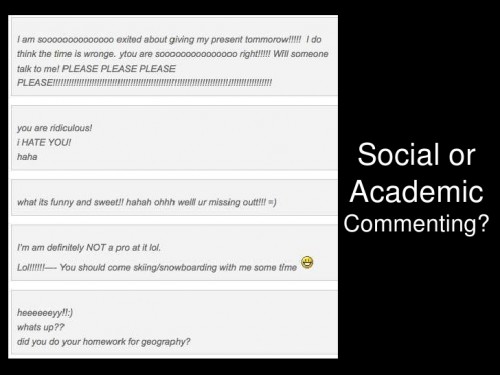
I found a few slides from my favorite blog, Langwitches, to help us review the difference between social and academic commenting. In school, we ALWAYS will used academic commenting...
Let's review the slides:
This is Social Commenting, and not the sort of thing we will be using at HTS:
I will expect thoughtful comments, like this:
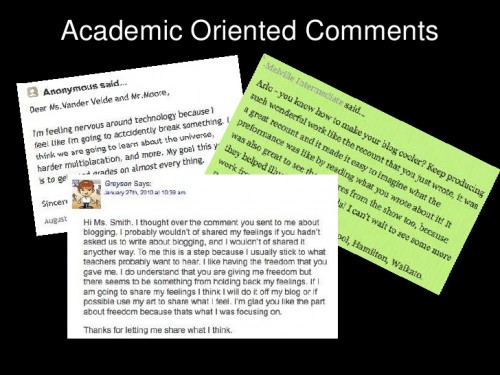
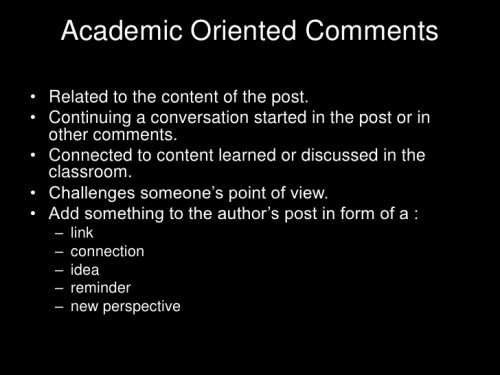
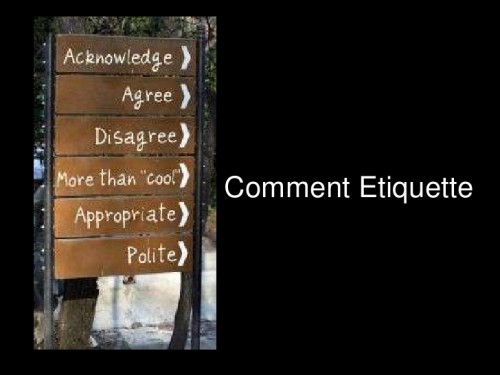
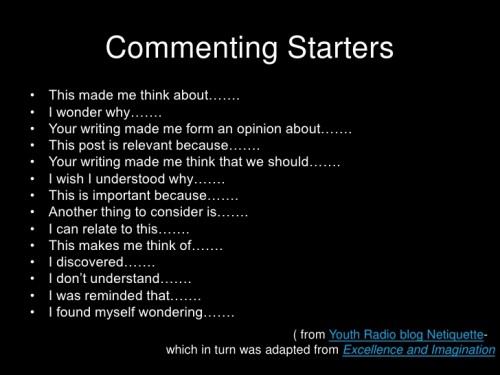
I will need to approve all your comments, so please be sure to follow these guidelines! You may comment on this post, or My Favorite Things post today.
Mrs. Morell
Thursday, September 5, 2013
Back to School Night
Welcome to Technology - Mrs. Mary Beth Morell and Ms. Polly Sileo
7th graders will meet with us during one 40-minute period each week, and 8th graders will meet during two 40-minute sessions - one with Mrs. Morell, and one with Ms. Sileo. Each of the 7th and 8th students has been issued a Google Chromebook for use in their core classes. Ipads are also available for use by the students. The idea is that we’re going to try to move more of the technology into the core classes, so that it’s better integrated with the subject matter.
Our tech classes this year will focus on the following areas:
- Scantron Testing – Scantron, the standardized testing required by the Archdiocese of Washington, will take place during technology class three times a year – September, February and May. Each round takes three weeks of class time.
- Keyboarding - only if necessary. By the end of 6th grade, we had hoped that our students would be typing 30 words per minute, as many of the final exams are given on computers at HTS. We will test the students, and if they are far below that mark, they will be given time in class to work on their skills.
- Online Research Skills - we will work on a variety of skills related to Internet searching and researching. We will review effective searching strategies, how to identify a reputable website, how to organize research, and how to cite a source properly using an online citation maker.
- Presentation Skills – We will use a range presentation tools for class projects such as blogs, PowerPoints, Prezis and iMovies.
- Yearbook - 8th Graders will create their personal yearbook pages. Please help us meet our deadlines by sending in pictures on the requested dates.
- Simple Programming - We will introduce some basic programming to our students.
Digital Citizenship
Throughout the year, we will be working with Counselor Cydney Lewis to do mini-lessons on Digital Citizenship, using the curriculum from Common Sense Media. Topics will include Privacy and Digital Footprints, Online Safety and Security, Connected Culture and Respecting Creative Work. Please consider subscribing to the parent newsletter on Common Sense Media http://www.commonsensemedia.org/ to help you navigate the constantly evolving world of social media with your child.
The Blog
Every week, we will provide updates on the 7th and 8th Grade Technology Blogs – our answer to a teacher homework page. Students will be able to access any links or resources we have posted, and parents will be able to see what we are doing in technology class. Our contact information will be there as well. The link to the blogs can be found on my homework page: http://www.htsdc.org/faculty-homework-pages/morell/
Cornerstone and Grades - Grades will be given periodically using Cornerstone, but because so much of our class is taken by standardized testing and tech “housekeeping,” grades will be given for the semester, not the quarter.
Questions, Comments or Suggestions? Reach us on mbmorell@htsdc.org or psileo@htsdc.org
Wednesday, August 28, 2013
Welcome to 7th Grade Tech!
Greetings all,
Ms. Sileo and I would like to give you an overview of how you will use Chromebooks this year.
Remember to get your Technology Agreement forms in so we can begin to use them in class!
This is going to be great...
Mrs. Morell and Ms. Sileo
Thursday, May 9, 2013
As you finish, TedEd videos
Be sure you have completed your teacher surveys first!
Check out this NBC Learn Site:

http://www.nbclearn.com/portal/site/learn/resources
Check out this NBC Learn Site:

http://www.nbclearn.com/portal/site/learn/resources
Thursday, April 25, 2013
After you finish your test today...
Watch a few of these:
Calculating Pi with Pies:
The (Archaeological) Search for King Richard:
What Cameras See That Our Eyes Don't:
The Mysteries of Vernacular: Clue:
The Mysteries of Vernacular: Assassin:
Ineptitude in the 40-Yard Dash:
Dare to Educate Afghan Girls:
Calculating Pi with Pies:
The (Archaeological) Search for King Richard:
What Cameras See That Our Eyes Don't:
The Mysteries of Vernacular: Clue:
The Mysteries of Vernacular: Assassin:
Ineptitude in the 40-Yard Dash:
Friday, March 22, 2013
Your Digital Footprint
Today, we will have a discussion about your Digital Footprint. It will start with a pair of videos from BrainPop - one on Social Networks and one on Information Privacy and one on Social Networking.
The we will watch the following videos from the folks at Common Sense Media:
Your homework - before you leave for break:
Submit the three photos - 20 points
Return the following sheet, signed by one of your parents - 20 points.


Wednesday, February 27, 2013
Haiku Deck
Hello Dear 7th Graders,
Today, we need to learn to navigate a new App in the iPads called Haiku Deck.

This is a cool presentation tool like Prezi or Power Point, but it has been designed for use on an iPad. Unlike the other options, Haiku deck does limit the amount of text you may use on a slide.

So today you will need to do the following tasks for a 20 point assignment:
1. Open Haiku deck, and set up an account using your HTS Email account, and the same password you use for Prezi and such.
2. Create 5 slides. Each slide must have an image, a title, and a line of text. This line of text must be a complete sentence.
3. Email the presentation to me at mbmorell@htsdc.org.
You may create a slideshow on one of the following ideas:
5 countries, cities or states... and perhaps why you would like to visit them. (or five places you have been)
5 birds, butterflies, mammals, or other critters...
5 castles, beaches, monuments, or mountains, landforms
I'm open to other options, but this is more about learning to use Haiku deck than obsessing about a theme :) I suggest you keep it simple, and take advantage of the gorgeous images that Haiku deck offers.
Have fun,
Mrs. Morell
Thursday, February 21, 2013
TedEd Film Festival
OK my friends. When you finish Scantron testing, you must be quiet to let others finish, so prepare to be amazed by this series of videos - mostly from TedEd. At the end of class, we will give you about ten minute to comment on which was your favorite and why, and which was your least favorite and why. This will be your 20 point participation grade for the day.
Friday, January 25, 2013


Thursday, January 24, 2013
Lego Robotics!
Over the past few weeks, we have started to build lego robots in technology class.
Next step: programming them! Your tasks will be posted here soon...


Next step: programming them! Your tasks will be posted here soon...


Friday, January 4, 2013
Study Skills
Happy New Year 7th Grade!
Quizlet is a fun interactive way to memorize information for school. I find Quizlet is especially helpful for learning foreign languages, history dates and terms, and vocabulary for all classes. It is used quite a bit in the Morell home.
Here's a quick overview of what Quizlet is:
You'll all set up your own accounts using your HTS Email... and as always, I'd like you to use the same password you always use in order to be sure you can remember it.
The link to Quizlet can be found here: http://quizlet.com
I'll walk you through how to set up a list of terms... I thought we should use a list of "100 Words Every Middle Schooler Should Know" (with thanks to the folks at American Heritage Dictionary)
adversary
|
aplomb
|
apprehensive
|
aptitude
|
attentive
|
banish
|
barricade
|
bluff
|
brackish
|
brandish
|
circumference
|
commotion
|
concoction
|
conspicuous
|
contortion
|
counter
|
cunning
|
debris
|
defiance
|
deft
|
destination
|
diminish
|
disdain
|
dismal
|
dispel
|
eavesdrop
|
egregious
|
ember
|
emerge
|
engross
|
exasperation
|
exhilarate
|
falter
|
foresight
|
fragrance
|
furtive
|
grueling
|
gusto
|
habitation
|
hasten
|
headway
|
ignite
|
illuminate
|
impending
|
imperious
|
jabber
|
jargon
|
jostle
|
jut
|
kindle
|
knoll
|
luminous
|
malleable
|
materialize
|
meander
|
meticulous
|
misgivings
|
momentum
|
monotonous
|
multitude
|
muster
|
narrate
|
obscure
|
ominous
|
outlandish
|
persistent
|
pertinent
|
potential
|
precipice
|
pristine
|
pristine
|
quell
|
recluse
|
recuperate
|
replenish
|
repugnant
|
restitution
|
sabotage
|
scarcity
|
scurry
|
serenity
|
sociable
|
somber
|
specimen
|
stamina
|
subside
|
swagger
|
swarm
|
tactic
|
terse
|
translucent
|
uncanny
|
unsightly
|
versatile
|
vigilant
|
vulnerable
|
waft
|
waver
|
weather
|
zeal
|
I would like you to enter at least 20 of these terms, and quiz yourself using the various games and activities.
Online Textbook Resources
The other thing that you should always be aware of are the textbook resources available online.
For example, did you know that your Social Studies textbook has an online link:
Western World - Social Studies Textbook
Spanish Textbook Link
Vocabulary Online Activities
Subscribe to:
Posts (Atom)